Using aliases
Aliases provide a consistent access to Kanzi objects. You can use aliases to access objects both in Kanzi Studio and Kanzi Engine.
Creating an alias
To create an alias:
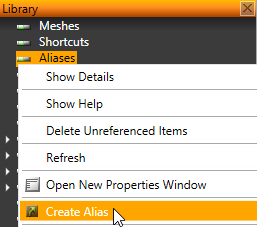
- In the Library right-click Aliases and select Create Alias.
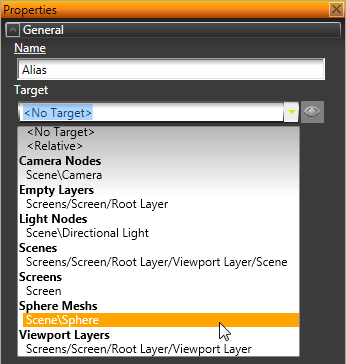
- In the Properties set:
- Name to the name by which you want to refer to the object in code.
- Target to the object you want to refer to.
Using an alias to set a target for an action
To use an alias to define a target item for an action:
- Create an alias. See Creating an alias.
- Add a trigger to an object. See Using triggers.
- In the Properties click the drop-down menu select an action.
For example, select Play Animation action
- In the Message Editor set the Target Item property to the alias you created in the first step.
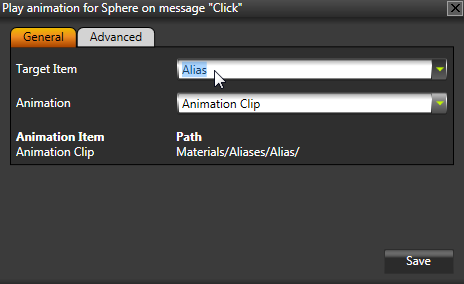
- Click Save.
Using aliases to access objects in Kanzi Engine
To use aliases to access objects in Kanzi Engine use
/* Where #Alias points to the descendant and is located in a context */
/* reachable from the objectNode. */
descendantNode = kzuObjectNodeGetRelative(objectNode, "#Alias");
See also
Aliases
Shortcuts
Using shortcuts
Open topic with navigation